Requires macOS 14.0 or later

Create pro-level tutorials with zero editing.

A Mac screen recording app that smoothly auto-tracks your mouse, overlays keystrokes and your webcam — turning your screen into an engaging presentation instantly.

No subscriptions. Pay once, use forever.

Features

Cut your editing time to zero.

Zoom effects and text overlays that you used to add in post-production are now automatically composed while you record.

Cinematic Auto-Zoom

Professional camera work powered by physical algorithms (PD control). It smoothly tracks your mouse movements and active input forms, naturally guiding the viewer's attention.

Keystroke OSD

Stylishly display your shortcut key presses on screen. Switch between showing all inputs or just shortcuts containing modifiers (like ⌘ or ⇧) in Pro mode.

Mouse Click Effects

Display beautiful ripple animations upon clicking. Visually communicates exactly where you clicked, making it ideal for software tutorials.

Cursor Text

Displays what's under your cursor. Button names and labels appear near the pointer, making it easy to understand elements at a glance.

PRO

Webcam PiP (Wipe)

Automatically composite your face into the corner of the video. Beautiful rounded corners and drop shadows are applied automatically, staying fixed in position even while zooming.

PRO

Dual Recording Pipeline

Simultaneously save an unzoomed, full-screen backup MP4 alongside your auto-zoomed video. Perfect if you ever decide to do advanced post-editing later.

Native Mac Performance

Built on the latest ScreenCaptureKit for buttery-smooth 60FPS recording with hardware encoding (HEVC/H.265) and zero system lag. Wide color gamut (Display P3) supported.

Who is this for?

Designed for anyone who shares their screen to teach, demo, or present.

  • Engineers & Developers

    Perfect for code walkthroughs and tool demos. Auto-zoom makes small text crisp and readable, while keystroke display clearly shows your shortcuts.

  • Educators & Creators

    Ideal for YouTubers and online instructors. Create high-quality educational content instantly with PiP webcam overlays and guiding zoom animations.

  • Sales & Customer Support

    Record product demos or step-by-step guides for clients directly from the menu bar, ready to share in seconds without editing.
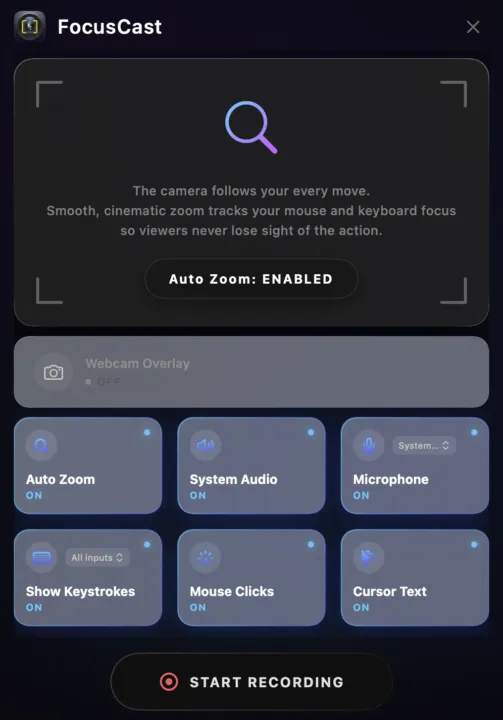
FocusCast Settings Dashboard
One-time payment. Yours forever.

Simple, One-Time Pricing

Break free from subscriptions.
Pay once and enjoy all future minor updates for free.

Free

Basic features, free forever.

$0
  • Unlimited recording time
  • Auto-Zoom tracking
  • Basic Keystroke display
  • Automatic app updates
  • Includes Watermark
Free Download
RECOMMENDED

Pro

Advanced features for professional creators.

$ 39.99 / Lifetime
  • Remove Watermark
  • Webcam PiP Overlay
  • Dual Pipeline (Backup recording)
  • "Shortcuts Only" mode for keystrokes
  • Free updates included
Buy Pro Now

Frequently Asked Questions

FocusCast requires macOS 14.0 (Sonoma) or later, as it utilizes Apple's modern ScreenCaptureKit framework. It is fully compatible with both Apple Silicon (M1/M2/M3) and Intel Macs.
Yes. You can easily select which display you want to record from the menu bar settings.
Absolutely. You can toggle microphone and system audio recording independently in the settings. Any UI sounds made by FocusCast itself are automatically excluded from the recording.
One purchase grants you one license key, which can be activated on a single Mac. If you get a new Mac, you can easily deactivate the license on your old machine to use it on the new one.